Decoupling Temporal Services with Nexus and the Java SDK
Author:  Nikolay Advolodkin | Editor: Angela Zhou
In this walkthrough, you'll take a monolithic Temporal application — where Payments and Compliance share a single namespace — and split it into two independently deployable services connected through Temporal Nexus.
You'll define a shared service contract, implement a synchronous Nexus handler, and rewire the caller — all while keeping the exact same business logic and workflow behavior. By the end, you'll understand how Nexus lets teams decouple without sacrificing durability.
What you'll learn
- Register a Nexus Endpoint using the Temporal CLI
- Define a shared Nexus Service contract between teams with
@Serviceand@Operation - Implement a synchronous Nexus handler with
@ServiceImpland@OperationImpl - Swap an Activity call for a durable cross-team Nexus call
- Inspect Nexus operations in the Web UI Event History
Prerequisites
Before you begin this walkthrough, ensure you have:
- Knowledge of Java
- Knowledge of Temporal including Workflows, Activities, and Workers
- Clone this repository
Scenario
You work at a bank where every payment flows through three steps:
- Validate the payment (amount, accounts)
- Check compliance (risk assessment, sanctions screening) — must pass before payment can execute
- Execute the payment (call the gateway)
Two teams split this work:
| Team | Owns |
|---|---|
| Payments | Steps 1 & 3 — validate and execute |
| Compliance | Step 2 — risk assessment & regulatory checks |
The Problem
Right now, both teams' code runs on the same Worker. One process. One deployment. One blast radius.
Compliance isn't optional — every payment must pass risk assessment before execution. This hard dependency is dangerous: a bug in compliance code at 3 AM crashes payments too, because they share the same namespace and blast radius. The obvious fix is to split into separate namespaces and use an Activity to call across the boundary — wrapping an HTTP client or starting a remote Workflow. But then you're managing HTTP clients, routing, error mapping, and callback infrastructure yourself.
The Solution: Temporal Nexus
Nexus gives you team boundaries with durability. Each team gets its own Worker, deployment pipeline, and security perimeter — while Temporal manages durable, type-safe calls between them through a global gateway that handles discovery and routing. If the Compliance Worker goes down mid-call, the payment workflow just waits. When Compliance comes back, it picks up exactly where it left off — no retry logic, no data loss, no 3 AM page for the Payments team.
The decision to create separate namespaces and whether to use Nexus is a decision of architecture and context, not solely team boundaries. Teams may share a namespace, or a single team may use multiple namespaces. Decide primarily based on isolation requirements, blast radius, and security boundaries — not just org chart lines. For production namespace strategies, see Managing Namespaces Best Practices.
The best part? The code change is almost invisible:
// BEFORE (monolith — direct activity call):
ComplianceResult compliance = complianceActivity.checkCompliance(compReq);

// AFTER (Nexus — durable cross-team call):
ComplianceResult compliance = complianceService.checkCompliance(compReq);
Same method name. Same input. Same output. Completely different architecture.
Here's what happens when the Compliance Worker goes down mid-call — and why it doesn't matter:
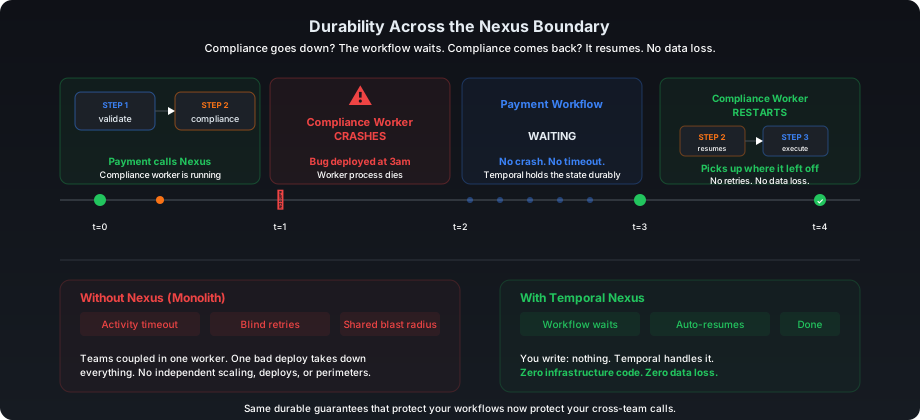
Why Nexus over an Activity-wrapped HTTP call or a shared Activity?
You could split Payments and Compliance into separate namespaces and use an Activity to call across the boundary — wrapping an HTTP client or starting a remote Workflow. But then you're managing HTTP clients, routing, error mapping, and callback infrastructure yourself. With a shared Activity, the Compliance team must ship their code into the Payments Worker — creating governance, versioning, and access control challenges. Think of a Nexus Operation as a built-in system Activity that handles routing, permissions, and efficiently getting responses from long-running operations. Here's how the options compare:
| Activity wrapping HTTP call | Shared Activity (same namespace) | Temporal Nexus | |
|---|---|---|---|
| Worker goes down | Activity retries the HTTP call | Same crash domain | Other replicas continue; if all down, workflow pauses and auto-resumes |
| Retry logic | Activity retry policy + HTTP errors | Temporal retries within team | Built-in across namespace boundary |
| Routing | You manage service discovery + URLs | N/A (same namespace) | Built-in, Temporal routes to target namespace |
| Permissions | Custom auth between services | Shared namespace access | Scoped cross-namespace permissions |
| Type safety | OpenAPI + code gen | Java interface | Shared Java interface |
| Human review | Custom callback URLs | Couples teams together | @UpdateMethod on the underlying workflow (async updates not yet supported across Nexus) |
| Code independence | Separate repos, custom contracts | Must ship code into shared Worker | Components deploy independently with clear separation of concerns |
| Team isolation | Separate services, shared API contract | Same namespace, shared access | Separate namespaces, scoped access |
| Code change | Update HTTP client + server | — | One-line stub swap, also nexus-rpc-gen generates code automatically |
Try the Nexus Quick Start for a faster path. Come back here for the full decoupling exercise.
Overview

The Payments team owns validation and execution (left). The Compliance team owns risk assessment, isolated behind a Nexus boundary (right). Data flows left-to-right — and if the Compliance side goes down mid-check, the payment resumes when it comes back.
What You'll Build
You'll start with a monolith where everything — the payment workflow, payment activities, and compliance checks — runs on a single Worker. By the end, you'll have two independent Workers: one for Payments and one for Compliance, communicating through a Nexus boundary.
BEFORE (Monolith):                    AFTER (Nexus Decoupled):
┌─────────────────────────┐           ┌──────────────┐    ┌──────────────┐
│   Single Worker         │           │  Payments    │    │  Compliance  │
│   ─────────────         │           │  Worker      │    │  Worker      │
│   Workflow              │           │  ──────      │    │  ──────      │
│   PaymentActivity       │    →      │  Workflow    │◄──►│  NexusHandler│
│   ComplianceActivity    │           │  PaymentAct  │    │  Checker     │
│                         │           │              │    │              │
│   ONE blast radius      │           │  Blast #1    │    │  Blast #2    │
└─────────────────────────┘           └──────────────┘    └──────────────┘
                                                   ▲ Nexus ▲
Checkpoint 0: Run the Monolith
Don't forget to clone this repository for the exercise!
Before changing anything, let's see the system working. You need 3 terminal windows and a running Temporal server. Navigate into the java/decouple-monolith/exercise directory in each terminal.
Terminal 0 — Temporal Server (if not already running):
temporal server start-dev
Terminal 1 — Create namespaces (one-time setup):
temporal operator namespace create --namespace payments-namespace
temporal operator namespace create --namespace compliance-namespace
Terminal 1 — Start the monolith Worker:
mvn compile exec:java@payments-worker
You should see:
Payments Worker started on: payments-processing
Registered: PaymentProcessingWorkflow, PaymentActivity
            ComplianceActivity (monolith — will decouple)
Terminal 2 — Run the starter:
mvn compile exec:java@starter
Switch to payments-namespace in the Temporal UI using the namespace selector at the top of the Web UI.
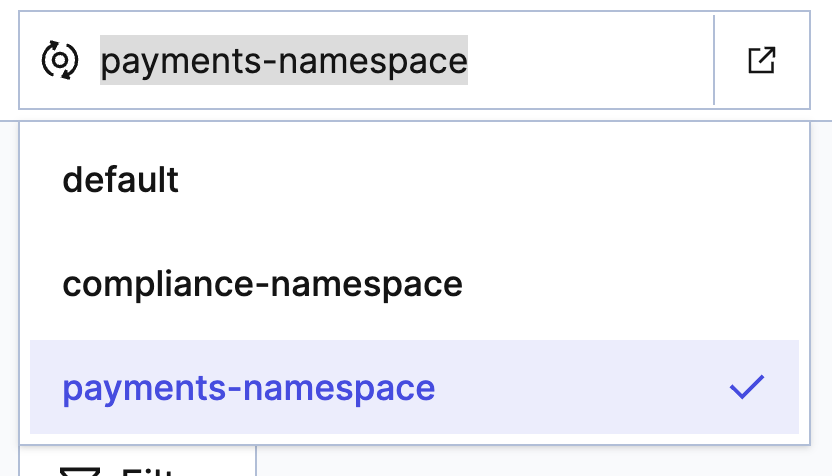
You created two namespaces earlier. Right now everything runs in payments-namespace, but once you decouple the system, your workflows will span both:
payments-namespace— where the payment workflows run.compliance-namespace— where the compliance workflows will run after decoupling.
Use the namespace selector at the top of the Temporal UI to switch between them. You'll need to check both namespaces throughout the rest of this tutorial.
Expected results:
| Transaction | Amount | Route | Risk | Result |
|---|---|---|---|---|
TXN-A | $250 | US → US | LOW | COMPLETED |
TXN-B | $12,000 | US → UK | MEDIUM | COMPLETED |
TXN-C | $75,000 | US → US | HIGH | DECLINED_COMPLIANCE |
Checkpoint 0 passed if all 3 transactions complete with the expected results. The system works! Now let's decouple it.
Stop the monolith Worker by pressing Ctrl+C in Terminal 1. The starter in Terminal 2 should have already exited on its own.
Nexus Building Blocks
Before diving into code, here's a quick map of the 4 Nexus concepts you'll encounter:
Service    →    Operation    →    Endpoint      →      Registry
(contract)      (method)          (routing rule)      (directory)
- Nexus Service — A named collection of operations — the contract between teams. In this tutorial, that's the
ComplianceNexusServiceinterface. Think of it like the Activity interface you already have, but shared across services instead of internal to one Worker. - Nexus Operation — A single callable method on a Service, marked with
@Operation(e.g.,checkCompliance). This is the Nexus equivalent of an Activity method — the actual work the other team exposes. - Nexus Endpoint — A named routing rule that connects a caller to the right Namespace and Task Queue, so the caller doesn't need to know where the handler lives. You create
compliance-endpointand point it at thecompliance-risktask queue. - Nexus Registry — The directory in Temporal where all Endpoints are registered. You register the endpoint once; callers look it up by name.
Quick match — test yourself!
Can you match each Nexus concept to what it represents in our payments scenario?
The TODOs
Pre-provided: The ComplianceWorkflow interface and implementation are already complete in the exercise. They use Temporal patterns you've already seen — @WorkflowMethod, @UpdateMethod, and Workflow.await(). Your work starts at TODO 1 — the Nexus-specific parts.
| # | File | Operation | Key Concept |
|---|---|---|---|
| 1 | shared/nexus/ComplianceNexusService.java | Your work | @Service + @Operation on both operations |
| 2 | compliance/temporal/ComplianceNexusServiceImpl.java | Your work | fromWorkflowHandle (async) + OperationHandler.sync (sync) |
| 3 | compliance/temporal/ComplianceWorkerApp.java | Your work | Register workflow + Activity + Nexus handler |
| 4 | payments/temporal/PaymentProcessingWorkflowImpl.java | Modify | Replace Activity stub → Nexus stub |
| 5 | payments/temporal/PaymentsWorkerApp.java | Modify | Add NexusServiceOptions, remove ComplianceActivity |
You'll work through these files in order: define the service interface (1), implement the handlers (2), register everything in the Worker (3), then update the caller to use Nexus instead of a direct Activity (4-5). After that, you'll run the full system end-to-end.
What we're building
Class Interaction Flow
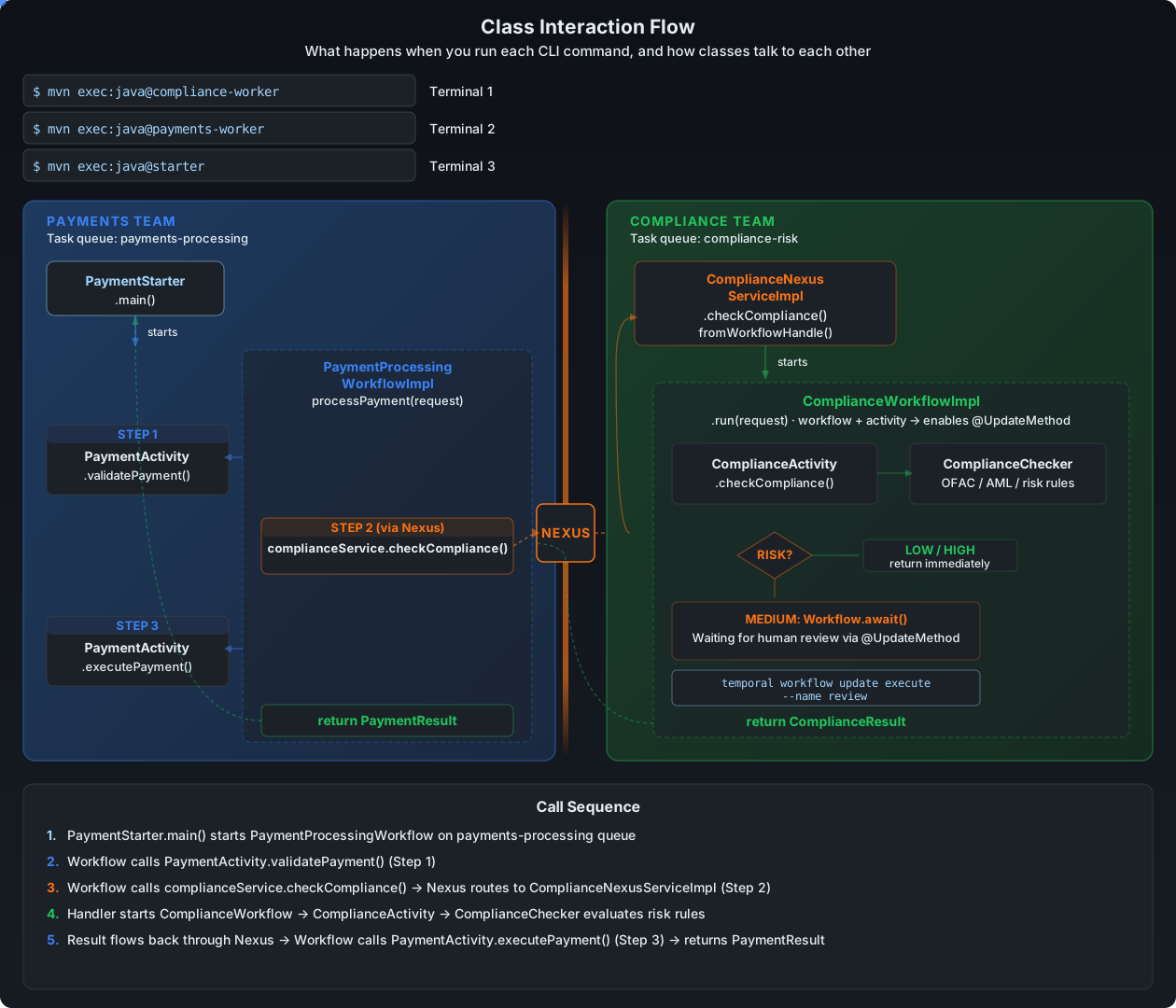
The Compliance Workflow (already in the exercise)
Files: compliance/temporal/workflow/ComplianceWorkflow.java and ComplianceWorkflowImpl.java
ComplianceWorkflowImpl (condensed)
public class ComplianceWorkflowImpl implements ComplianceWorkflow {

    @Override
    public ComplianceResult run(ComplianceRequest request) {
        // Step 1: Run automated compliance check
        autoResult = complianceActivity.checkCompliance(request);

        // 10s durable sleep — gives you a window to test Nexus durability (Checkpoint 3)
        Workflow.sleep(Duration.ofSeconds(10));

        // Step 2: LOW or HIGH risk → return immediately
        if (!"MEDIUM".equals(autoResult.getRiskLevel())) {
            return autoResult;
        }

        // Step 3: MEDIUM risk → wait for human review via Update
        Workflow.await(() -> reviewResult != null);
        return reviewResult;
    }

    @Override
    public ComplianceResult review(boolean approved, String explanation) {
        // Stores the decision and unblocks run()
        this.reviewResult = new ComplianceResult(..., approved, "MEDIUM", explanation);
        return reviewResult;
    }

    @Override
    public void validateReview(boolean approved, String explanation) {
        // Rejects reviews that arrive at the wrong time
        if (autoResult == null || !"MEDIUM".equals(autoResult.getRiskLevel()))
            throw new IllegalStateException("Workflow is not awaiting review");
        if (reviewResult != null)
            throw new IllegalStateException("Review already submitted");
    }
}
Read the code - you'll see the human-in-the-loop pattern you'll wire up through Nexus later. The three methods:
run()— Scores risk via Activity, sleeps 10s (for the durability demo), then either auto-decides (LOW/HIGH) or durably waits for human review (MEDIUM).review()— Receives the reviewer's approve/deny decision, stores it, and unblocksrun().validateReview()— Guards against reviews arriving before the workflow is waiting or after a decision was already made.
Why a workflow, not just an Activity? Using a workflow unlocks @UpdateMethod for MEDIUM-risk transactions — the workflow can wait durably for a human reviewer's decision. A plain Activity can't do that. In the future, simple cases might just use an Activity, but a workflow gives you durability and human escalation for free.
Your work starts below at TODO 1.
TODO 1: Create the Nexus Service Interface
File: shared/nexus/ComplianceNexusService.java
This is the shared contract between teams — like an OpenAPI spec, but durable. Both teams depend on this interface.
What to add for TODO 1:
@Serviceannotation on the interface - this registers the interface as a Nexus Service so Temporal knows it's a cross-team contract, not just a regular Java interface.@Operationannotation on both methods - this marks each method as a callable Nexus Operation. Without it, the method is just a Java method signature that Temporal won't expose through the Nexus boundary.
The Nexus runtime validates all methods in a @Service interface at Worker startup. Every method must have @Operation — even ones you won't call right away — or the Worker will fail with Missing @Operation annotation.
Pattern to follow:
@Service
public interface ComplianceNexusService {
    @Operation
    ComplianceResult checkCompliance(ComplianceRequest request);

    @Operation
    ComplianceResult submitReview(ReviewRequest request);
}
Look in the solution directory of the exercise repository if you need a hint!
TODO 2: Implement the Nexus Handlers
File: compliance/temporal/ComplianceNexusServiceImpl.java
This class implements both Nexus operations. You'll use two different handler patterns — one for starting a long-running workflow, one for interacting with an already-running workflow.
Just like the interface needs @Operation on every method, the handler class needs an @OperationImpl method for every operation — or the Worker will fail at startup with Missing handlers for service operations.
What to add for TODO 2:
@ServiceImpl(service = ComplianceNexusService.class)on the class — this links the handler to its service interface so Temporal can route incoming Nexus operations to the correct implementation.@OperationImplon each handler method — this marks the method as the handler for a specific Nexus operation. Without it, Temporal won't know which method handles which operation.
Complete implementation of ComplianceNexusServiceImpl.java
@ServiceImpl(service = ComplianceNexusService.class)
public class ComplianceNexusServiceImpl {

    @OperationImpl
    public OperationHandler<ComplianceRequest, ComplianceResult> checkCompliance() {
        return WorkflowRunOperation.fromWorkflowHandle((ctx, details, input) -> {
            WorkflowClient client = Nexus.getOperationContext().getWorkflowClient();
            ComplianceWorkflow wf = client.newWorkflowStub(
                    ComplianceWorkflow.class,
                    WorkflowOptions.newBuilder()
                            .setTaskQueue("compliance-risk")
                            .setWorkflowId("compliance-" + input.getTransactionId())
                            .build());

            return WorkflowHandle.fromWorkflowMethod(wf::run, input);
        });
    }

    @OperationImpl
    public OperationHandler<ReviewRequest, ComplianceResult> submitReview() {
        return OperationHandler.sync((ctx, details, input) -> {
            WorkflowClient client = Nexus.getOperationContext().getWorkflowClient();
            ComplianceWorkflow wf = client.newWorkflowStub(
                    ComplianceWorkflow.class,
                    "compliance-" + input.getTransactionId());
            return wf.review(input.isApproved(), input.getExplanation());
        });
    }
}
This class has two handlers that use different patterns:
checkCompliance— UsesWorkflowRunOperation.fromWorkflowHandleto start a long-running workflow. The handle binds the Nexus operation to a workflow ID, so retries reuse the existing workflow instead of creating duplicates.submitReview— UsesOperationHandler.syncto interact with an already-running workflow. It looks upcompliance-{transactionId}and sends a review Update. Sync handlers must complete within 10 seconds.
This tutorial uses an @UpdateMethod for submitReview because it returns the compliance result synchronously — the caller gets the answer immediately.
However, an @UpdateMethod requires the Worker to be running at the time of the call; if the Worker is down, the Update will fail. An alternative is to use a Signal instead, which is delivered to the workflow's Event History even when the Worker is offline. The trade-off: Signals are fire-and-forget — the caller doesn't get a return value, so you'd need a separate mechanism (e.g., a Query or another Nexus operation) to retrieve the result.

Key differences between the two handlers:
checkCompliance | submitReview | |
|---|---|---|
| Pattern | fromWorkflowHandle | OperationHandler.sync |
| What it does | Starts a new long-running workflow | Sends Update to an existing workflow |
| Durability | Async — workflow runs independently | Sync — must complete in 10 seconds |
| Retry behavior | Retries reuse the same workflow | Update is idempotent if workflow ID is stable |
Quick Check
Q1: What does @ServiceImpl(service = ComplianceNexusService.class) tell Temporal?
@ServiceImpl links the handler class to its Nexus service interface. Temporal uses this to route incoming Nexus operations to the correct handler.Q2: Why does the handler start a workflow instead of calling ComplianceChecker.checkCompliance() directly?
TODO 3: Create the Compliance Worker
File: compliance/temporal/ComplianceWorkerApp.java
Standard CRWL pattern, but now with three registrations. Open the file - you'll see the Connect, Factory, and Launch steps are already written. The registration lines are commented out.
C — Connect to Temporal
R — Create factory and Worker on "compliance-risk"
W — Wire:
    1. worker.registerWorkflowImplementationTypes(ComplianceWorkflowImpl.class)
    2. worker.registerActivitiesImplementations(new ComplianceActivityImpl(new ComplianceChecker()))
    3. worker.registerNexusServiceImplementation(new ComplianceNexusServiceImpl())
L — Launch
Uncomment the three lines inside the "Wire" section:
// TODO: W — Register workflow, activity, and Nexus handler
worker.registerWorkflowImplementationTypes(ComplianceWorkflowImpl.class);
worker.registerActivitiesImplementations(new ComplianceActivityImpl(new ComplianceChecker()));
worker.registerNexusServiceImplementation(new ComplianceNexusServiceImpl());
The first two are patterns you already know. The third is new - registerNexusServiceImplementation registers your Nexus handler so the Worker can receive incoming Nexus calls. Same shape, different method name.
The task queue name is compliance-risk — remember this value. You'll use it again in Checkpoint 1.5 when you create the Nexus endpoint. The endpoint routes incoming Nexus calls to a task queue; the Worker polls that same queue to pick them up. They must match.
Checkpoint 1: Compliance Worker Starts
Terminal 1 — Start the Compliance Worker:
mvn compile exec:java@compliance-worker
Checkpoint 1 passed if you see:
Compliance Worker started on: compliance-risk
Keep the compliance Worker running — you'll need it for Checkpoint 2.
Are you enjoying this tutorial? Sign up here to get notified when we drop new educational content!
Checkpoint 1.5: Create the Nexus Endpoint
Now that the compliance side is built, register the Nexus endpoint with Temporal. This tells Temporal: "When someone calls compliance-endpoint, route it to the compliance-risk task queue in compliance-namespace."
temporal operator nexus endpoint create \
  --name compliance-endpoint \
  --target-namespace compliance-namespace \
  --target-task-queue compliance-risk
You should see:
Endpoint compliance-endpoint created.
Analogy: This is like adding a contact to your phone. The endpoint name is the contact name; the task queue + namespace is the phone number. You only do this once.
Without this, the Payments Worker (TODO 5) won't know where to route ComplianceNexusService calls.
TODO 4: Replace Activity Stub with Nexus Stub
File: payments/temporal/PaymentProcessingWorkflowImpl.java
You're replacing the Activity stub with a Nexus stub — same method call, but it now crosses a namespace boundary. The compliance check is a blocking dependency — the workflow cannot proceed to executePayment until checkCompliance returns a passing result. With Nexus, this dependency is preserved with full durability across the team boundary.
What to change for TODO 4:
- Replace the
ComplianceActivityActivity stub with aComplianceNexusServiceNexus stub — this swaps the Activity call for a durable cross-namespace Nexus call. The stub usesWorkflow.newNexusServiceStubinstead ofWorkflow.newActivityStub. - Rename the variable:
complianceActivitybecomescomplianceService— socomplianceActivity.checkCompliance(compReq)becomescomplianceService.checkCompliance(compReq). Same method name, same input, same output.
BEFORE:
private final ComplianceActivity complianceActivity =
    Workflow.newActivityStub(ComplianceActivity.class, ACTIVITY_OPTIONS);

// In processPayment():
ComplianceResult compliance = complianceActivity.checkCompliance(compReq);
AFTER:
private final ComplianceNexusService complianceService = Workflow.newNexusServiceStub(
    ComplianceNexusService.class,
    NexusServiceOptions.newBuilder()
        .setOperationOptions(NexusOperationOptions.newBuilder()
            .setScheduleToCloseTimeout(Duration.ofMinutes(10))
            .build())
        .build());

// In processPayment():
ComplianceResult compliance = complianceService.checkCompliance(compReq);
Workflow.newNexusServiceStubreplacesWorkflow.newActivityStub— the workflow now makes a durable Nexus call across the namespace boundary.NexusServiceOptionswithscheduleToCloseTimeoutreplacesActivityOptionswithstartToCloseTimeout— same idea (how long to wait), different scope (cross-namespace vs same namespace).- The method call (
checkCompliance) stays identical — the workflow doesn't know or care that the implementation moved to a different Worker.
What changed: Drag each Nexus replacement to its monolith equivalent:
Your feedback shapes what we make next. Use the Feedback widget on the side to tell us what’s working and what’s missing!
TODO 5: Update the Payments Worker
File: payments/temporal/PaymentsWorkerApp.java
What to change for TODO 5:
- Replace the simple
registerWorkflowImplementationTypescall with one that includesNexusServiceOptions— this maps theComplianceNexusServiceinterface to thecompliance-endpointyou created in Checkpoint 1.5, so the Worker knows where to route Nexus calls. Register bothPaymentProcessingWorkflowImplandReviewCallerWorkflowImplin the same call. - Delete the
ComplianceActivityImplregistration — compliance now runs on its own Worker via Nexus, so the Payments Worker no longer needs it.
CHANGE 1: Register both workflows with NexusServiceOptions (maps service to endpoint):
worker.registerWorkflowImplementationTypes(
    WorkflowImplementationOptions.newBuilder()
        .setNexusServiceOptions(Collections.singletonMap(
            "ComplianceNexusService",      // interface name (no package)
            NexusServiceOptions.newBuilder()
                .setEndpoint("compliance-endpoint")  // matches CLI endpoint
                .build()))
        .build(),
    PaymentProcessingWorkflowImpl.class,
    ReviewCallerWorkflowImpl.class);       // both workflows use the same Nexus endpoint
Notice the workflow (TODO 4) never references this endpoint — only the Worker does. This keeps the workflow portable: you can point it at a different endpoint in staging vs production without changing workflow code.
CHANGE 2: Remove ComplianceActivityImpl registration:
// DELETE these lines:
ComplianceChecker checker = new ComplianceChecker();
worker.registerActivitiesImplementations(new ComplianceActivityImpl(checker));
Analogy: You're removing the compliance department from your building and adding a phone extension to their new office. The workflow dials the same number (
checkCompliance), but the call now routes across the street.
New PaymentsWorkerApp.java Code
package payments.temporal;

import io.temporal.client.WorkflowClient;
import io.temporal.client.WorkflowClientOptions;
import io.temporal.serviceclient.WorkflowServiceStubs;
import io.temporal.worker.Worker;
import io.temporal.worker.WorkerFactory;
import io.temporal.worker.WorkflowImplementationOptions;
import io.temporal.workflow.NexusServiceOptions;
import payments.PaymentGateway;
import payments.Shared;
import payments.temporal.activity.PaymentActivityImpl;

import java.util.Collections;

/**
 * DECOUPLED VERSION — Payments worker with Nexus endpoint mapping.
 *
 * Changes from monolith:
 *   1. Workflow registered with NexusServiceOptions (endpoint mapping)
 *   2. ComplianceActivityImpl registration removed (lives on compliance worker now)
 */
public class PaymentsWorkerApp {

    public static void main(String[] args) {
        // C — Connect to Temporal (payments-namespace)
        WorkflowServiceStubs service = WorkflowServiceStubs.newLocalServiceStubs();
        WorkflowClientOptions clientOptions = WorkflowClientOptions.newBuilder()
                .setNamespace("payments-namespace")
                .build();
        WorkflowClient client = WorkflowClient.newInstance(service, clientOptions);

        // R — Register with Nexus endpoint mapping
        WorkerFactory factory = WorkerFactory.newInstance(client);
        Worker worker = factory.newWorker(Shared.TASK_QUEUE);

        worker.registerWorkflowImplementationTypes(
                WorkflowImplementationOptions.newBuilder()
                        .setNexusServiceOptions(Collections.singletonMap(
                                "ComplianceNexusService",
                                NexusServiceOptions.newBuilder()
                                        .setEndpoint("compliance-endpoint")
                                        .build()))
                        .build(),
                PaymentProcessingWorkflowImpl.class,
                ReviewCallerWorkflowImpl.class);

        // A — Activities (payment only — compliance moved to its own worker)
        PaymentGateway gateway = new PaymentGateway();
        worker.registerActivitiesImplementations(new PaymentActivityImpl(gateway));

        // L — Launch
        factory.start();

        System.out.println("=========================================================");
        System.out.println("  Payments Worker started on: " + Shared.TASK_QUEUE);
        System.out.println("  Namespace: payments-namespace");
        System.out.println("  Registered: PaymentProcessingWorkflow, ReviewCallerWorkflow, PaymentActivity");
        System.out.println("  Nexus: ComplianceNexusService → compliance-endpoint");
        System.out.println("=========================================================");
    }
}
Checkpoint 2: Decoupled End-to-End (Automated Decisions)
You need 4 terminal windows now:
Terminal 1: Temporal server (already running)
Terminal 2 — Compliance Worker (already running from Checkpoint 1, or restart):
mvn compile exec:java@compliance-worker
Terminal 3 — Payments Worker (restart with your changes):
mvn compile exec:java@payments-worker
Terminal 4 — Starter:
mvn compile exec:java@starter
- TXN-A and TXN-C take ~10 seconds each (the compliance workflow includes a durable sleep for the Checkpoint 3 demo).
- TXN-B is MEDIUM risk — its workflow durably waits (
Workflow.await()) until a human reviewer submits a decision. It will stay waiting until you complete the human review path after Checkpoint 3.
The starter runs transactions in series, so TXN-B will block the terminal while it waits for human review. This is expected — TXN-C won't start yet.

Verify in the Temporal UI: switch to payments-namespace and compliance-namespace to confirm the following. Checkpoint 2 passed if you see:
- TXN-A completes with
COMPLETED(~10s, auto-approved). - TXN-B is running — the starter hangs, waiting for a human review decision. This is correct. Leave it running. In
compliance-namespace, you'll see the corresponding compliance workflow waiting too. - TXN-C has not started yet — it will run after TXN-B completes.
Two Workers, two blast radii, two independent teams. The automated compliance path works end-to-end through Nexus.
Checkpoint 3: Durability Across the Boundary
This is where it gets fun. Let's prove that Nexus is durable.
Note: In this tutorial, you run a single Worker replica, so killing it stops all compliance processing. In production, you'd run multiple replicas across hosts — if one goes down, the others keep processing. This checkpoint demonstrates the worst case: all replicas are gone. Even then, no data is lost.
Terminate any running workflows from Checkpoint 2 — including TXN-B, which is still waiting for human review. You must terminate it in both payments-namespace and compliance-namespace. Then stop both Workers (Ctrl+C in Terminals 2 and 3).
Read this section fully before starting — you'll have a ~10-second window to kill a Worker mid-flight, so know the plan before you run the starter.
The plan: Start both Workers, run the starter, then kill the compliance Worker during TXN-A's 10-second durable sleep. This proves that Nexus operations survive a Worker outage.
Terminal 1: Temporal server (already running)
Terminal 2 — Start the Compliance Worker:
mvn compile exec:java@compliance-worker
Terminal 3 — Start the Payments Worker:
mvn compile exec:java@payments-worker
Terminal 4 — Run the starter:
mvn compile exec:java@starter
The starter runs TXN-A first. TXN-A has a 10-second durable sleep in ComplianceWorkflowImpl. During that 10-second window:
Terminal 2 — Kill the compliance Worker (Ctrl+C)
Now watch what happens:
- Terminal 3 (starter) — hangs. It's waiting for the TXN-A result. No crash, no error.
- Temporal UI (
http://localhost:8233) — inpayments-namespace, open thepayment-TXN-Aworkflow. You'll see a Pending Nexus Operation event with a Started badge and an increasing attempt count. Temporal knows the compliance Worker is gone and is retrying until it comes back.

Terminal 2 — Restart the compliance Worker:
mvn compile exec:java@compliance-worker
Now watch:
- Terminal 2 (compliance Worker) — picks up the work immediately. You'll see
[ComplianceChecker] Evaluating TXN-Ain the logs. - Terminal 3 (starter) — TXN-A completes with
COMPLETED. The starter moves on to TXN-B and TXN-C as if nothing happened. - Temporal UI — check both namespaces. In
payments-namespace, the Nexus operation shows as completed. Incompliance-namespace, the compliance workflow completed successfully. No retries of the payment workflow. No duplicate compliance checks. The system just resumed.
Checkpoint 3 passed if TXN-A completes successfully after you restart the compliance Worker.
What just happened: The payment workflow didn't crash, timeout, or lose data — it just waited. When the compliance Worker came back, Temporal automatically routed the pending Nexus operation to it. Durability extends across the team boundary — that's the whole point of Nexus. With multiple replicas, another instance would pick up the work immediately with no visible interruption.
Complete the Human Review Path
You already implemented both handlers in TODO 2 — checkCompliance (async, fromWorkflowHandle) and submitReview (sync, OperationHandler.sync). Now let's use submitReview to approve TXN-B's MEDIUM-risk transaction.
How the review path works
Three pre-provided files work together to send a human review decision through the Nexus boundary:
payments/temporal/ReviewStarter.java — Client code that starts the review workflow:
ReviewRequest request = new ReviewRequest("TXN-B", true, "Approved after manual review");
ReviewCallerWorkflow workflow = client.newWorkflowStub(ReviewCallerWorkflow.class, workflowOptions);
ComplianceResult result = workflow.submitReview(request);
payments/temporal/ReviewCallerWorkflowImpl.java — A thin workflow that calls submitReview through the Nexus stub:
public ComplianceResult submitReview(ReviewRequest request) {
    return complianceService.submitReview(request);  // Nexus call
}
Why a workflow instead of calling temporal workflow update directly? Team boundaries. The Payments team doesn't need to know the Compliance team's workflow IDs or internal method names. The review goes through the same Nexus endpoint as checkCompliance — the Compliance team controls what's exposed.
The full flow:
ReviewStarterstarts aReviewCallerWorkflowin the payments namespace- The workflow calls
complianceService.submitReview()via the Nexus stub - Nexus routes to the Compliance team's sync handler (TODO 2b)
- The handler looks up the
compliance-TXN-Bworkflow and sends thereview()Update - The
ComplianceWorkflowunblocks, returns the result back through Nexus
Checkpoint: Approve TXN-B via Nexus
Make sure both Workers are running and TXN-B is still waiting from Checkpoint 2. If you need to restart, run the starter again first.
Terminal 4 — Approve TXN-B via Nexus:
mvn compile exec:java@review-starter
Want to deny instead? Edit
ReviewStarter.java, changetruetofalse, and re-run.
You should see the review result returned in Terminal 4, and back in Terminal 3, TXN-B completes with COMPLETED.
Checkpoint passed if TXN-B completes with COMPLETED after running the review starter.
Quiz
Test your understanding before moving on:
Q1: Where is the Nexus endpoint name (compliance-endpoint) configured?
PaymentsWorkerApp, via NexusServiceOptions → setEndpoint("compliance-endpoint"). The workflow only knows the service interface. The Worker knows the endpoint. This separation keeps the workflow portable.Q2: What happens if the Compliance Worker is down when the Payments workflow calls checkCompliance()?
scheduleToCloseTimeout expires (10 minutes in our case). If the Compliance Worker comes back within that window, the operation completes successfully. The Payment workflow just waits — no crash, no data loss.Q3: What's the difference between @Service/@Operation and @ServiceImpl/@OperationImpl?
@Service/@Operationgo on the interface — the shared contract both teams depend on@ServiceImpl/@OperationImplgo on the handler class — the implementation that only the Compliance team owns
Think of it as: the interface is the menu (shared), the handler is the kitchen (private).
Q4: What's wrong with using OperationHandler.sync() to back a Nexus operation with a long-running workflow?
sync() starts a workflow and blocks for its result in a single handler call. If the Nexus operation retries (which happens during timeouts or transient failures), the handler runs again from scratch — starting a duplicate workflow each time.The fix is WorkflowRunOperation.fromWorkflowHandle(), which returns a handle (like a receipt number) binding the Nexus operation to that workflow's ID. On retries, the infrastructure sees the handle and reuses the existing workflow instead of creating a new one.
Bad (creates duplicates on retry):
OperationHandler.sync((ctx, details, input) -> {
    WorkflowClient client = Nexus.getOperationContext().getWorkflowClient();
    ComplianceWorkflow wf = client.newWorkflowStub(...);
    WorkflowClient.start(wf::run, input);
    return WorkflowStub.fromTyped(wf).getResult(ComplianceResult.class);
});
Good (retries reuse the same workflow):
WorkflowRunOperation.fromWorkflowHandle((ctx, details, input) -> {
    WorkflowClient client = Nexus.getOperationContext().getWorkflowClient();
    ComplianceWorkflow wf = client.newWorkflowStub(...);
    return WorkflowHandle.fromWorkflowMethod(wf::run, input);
});
Q5: Why does the handler start a workflow instead of calling ComplianceChecker.checkCompliance() directly?
Sync handlers should only contain Temporal primitives — workflow starts and queries. Running arbitrary Java code (like ComplianceChecker.checkCompliance()) in a handler bypasses Temporal's durability guarantees.
The handler starts a ComplianceWorkflow and waits for its result. The actual business logic runs inside an Activity within the workflow, where it gets retries, timeouts, and heartbeats for free. Plus, the workflow can wait durably for human review via @UpdateMethod — something a direct call could never support.
What You Built
You started with a monolith and ended with two independent services connected through Nexus:
BEFORE (Monolith):                    AFTER (Nexus Decoupled):
┌─────────────────────────┐           ┌──────────────┐    ┌──────────────┐
│   Single Worker         │           │  Payments    │    │  Compliance  │
│   ─────────────         │           │  Worker      │    │  Worker      │
│   Workflow              │           │  ──────      │    │  ──────      │
│   PaymentActivity       │    →      │  Workflow    │◄──►│  NexusHandler│
│   ComplianceActivity    │           │  PaymentAct  │    │  Checker     │
│                         │           │              │    │              │
│   ONE blast radius      │           │  Blast #1    │    │  Blast #2    │
└─────────────────────────┘           └──────────────┘    └──────────────┘
                                                   ▲ Nexus ▲
Key concepts you used:
| Concept | What you did |
|---|---|
@Service + @Operation | Defined the shared contract between teams |
@ServiceImpl + @OperationImpl | Implemented the handler on the Compliance side |
fromWorkflowHandle | Backed a Nexus operation with a long-running workflow (retry-safe) |
OperationHandler.sync | Sent a workflow Update through the Nexus boundary |
Workflow.newNexusServiceStub | Replaced the Activity stub with a Nexus stub (one-line swap) |
NexusServiceOptions | Mapped the service interface to the endpoint in the Worker |
| Nexus Endpoint (CLI) | Registered the routing rule: endpoint name to namespace + task queue |
The fundamental pattern: same method call, different architecture. The workflow still calls checkCompliance() - but the call now crosses a team boundary with full durability. Each team can now modify, test, and deploy their service independently — that's the primary win.
What's Next?
From here you can explore more advanced patterns - multi-step compliance pipelines, async human escalation chains, or cross-namespace Nexus operations. See the Nexus documentation to learn more.
Don't forget to sign up here to get notified when we drop new educational content!